After 20 Years of Typing, I Found My Voice: An AI Voice Input Tool for 10,000 Words Daily
Voice Input · Local AI · Open Source
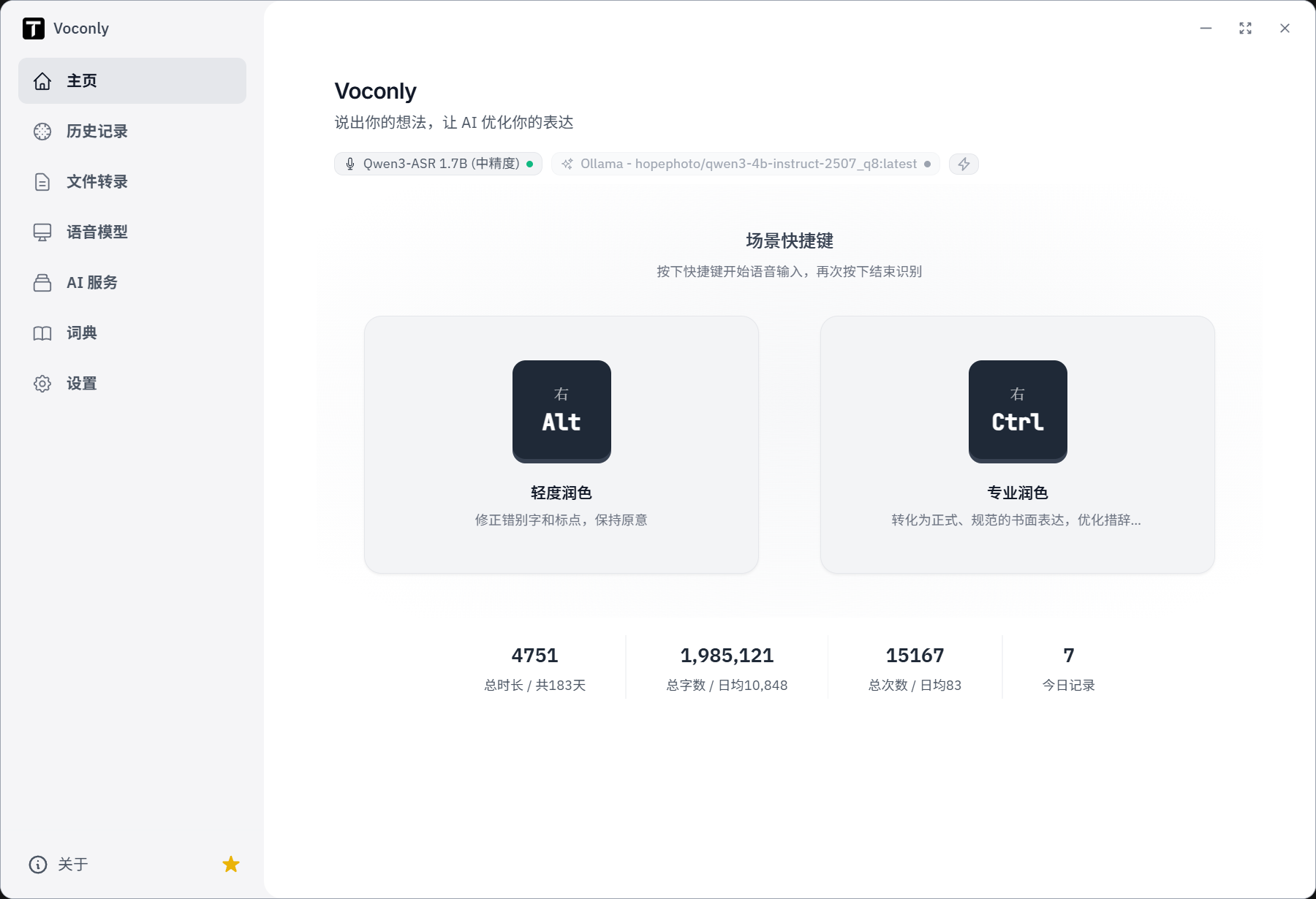
Let's start with some numbers. Here are the real statistics from my own computer:
In other words, during this period, I produced over ten thousand words daily by speaking rather than typing. Voice input is no longer just an occasional helper for capturing ideas—it's now part of my daily workflow: writing articles, organizing thoughts, replying to messages, and describing requirements. I often speak first, then let AI help me organize.
This article introduces the tool I built and use every day—Voconly.
1. What is Voconly?
One-sentence definition: A free, open-source, local-first AI voice input tool.
It's not a voice assistant that only works in one app. Voconly runs on your computer and launches voice input via global hotkeys. Whether you're using WeChat, Word, a browser, VS Code, Notion, or any other app where you can type text, after you finish speaking, the text can be output directly to the current cursor position.
It also does more than just speech-to-text. Combined with large language models, Voconly can transform natural spoken language into written text that's more suitable for actual use.
Website: voconly.com
Open Source: github.com/xinkyle/Voconly (MIT License)
Platforms: Windows 10/11, macOS (Apple Silicon). For specific installation methods and current features, please refer to the website and release notes.
2. Why might you need it? Four common pain points
1. Typing is too slow; ideas can't keep up
Thinking is fast, but turning ideas into text requires key-by-key input. When writing long texts, replying to messages, or recording inspiration, the input itself can become a bottleneck.
2. Transcribed results aren't directly usable
Raw transcripts may retain "um, uh, that," repeated expressions, and incomplete sentences—you still need to edit manually.
3. Privacy concerns and usage limits
Voice recordings may contain client information or business content. With local speech recognition, recordings can stay on your device; local recognition also doesn't require paying per use to Voconly.
4. Input workflow keeps getting interrupted
Switching windows, copying, pasting, and editing after speaking adds extra steps. Voconly's goal is to make text appear directly where you're working.
So Voconly aims to solve more than just recognition accuracy—it puts input efficiency, text quality, data control, and workflow continuity into the same chain.
3. Core Features: Explained by actual use cases
1. Global hotkeys: Speak wherever you need to input
No need to open the main interface first. Place your cursor where you need input, press a hotkey to start speaking, and after finishing, the text will appear at the current input position.
| Default Hotkey | Mode | Best For |
|---|---|---|
| Right Alt | Light Polish | Daily messages, inspiration recording—corrects punctuation and verbal expressions while preserving original meaning |
| Right Ctrl | Professional Polish | Emails, work descriptions, formal texts—transforms speech into more standardized written expression |
Hotkeys can be adjusted to your preference; available keys are determined by current version settings. There are also different options for ending recording: press the end key again to go through the complete text processing workflow; double-click the end key to output raw transcription directly, skipping AI processing.
For example, for quick replies in a chat window, you can get raw transcription directly; when dictating a formal email, you can use professional polish mode.
2. Multiple speech recognition models: Choose based on device and language
Different models have trade-offs in size, language performance, speed, and hardware requirements. Voconly supports multiple speech recognition models, and also supports downloading, switching, or importing models as provided in the current version.
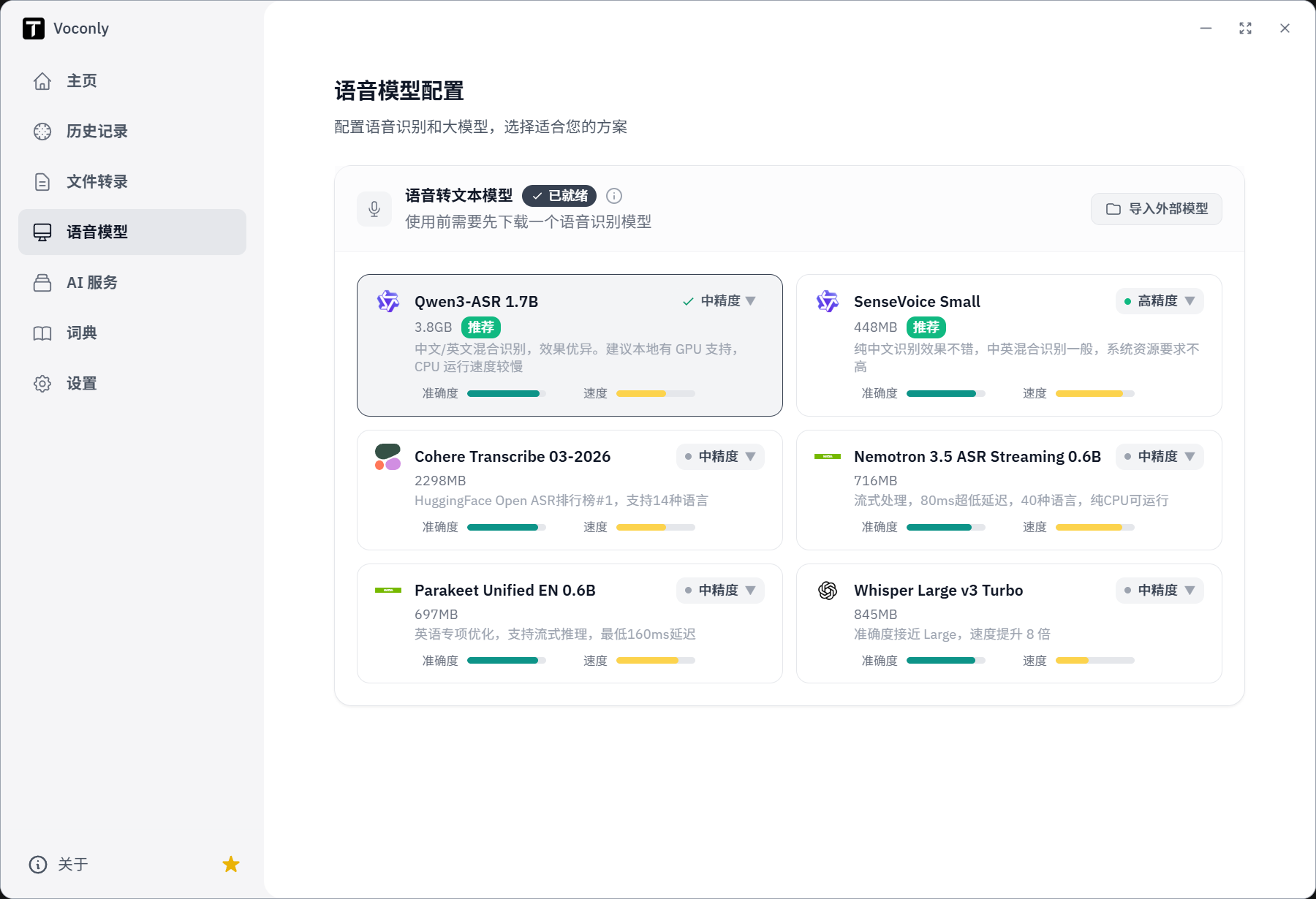
| Model | Recommended For |
|---|---|
| Qwen3-ASR | Chinese and mixed Chinese-English scenarios; try on devices with better performance |
| SenseVoice Small | Users who want to start with a smaller model |
| Cohere Transcribe | Users who need multilingual recognition |
| Nemotron ASR | Users focused on streaming recognition and low-latency experience |
| Parakeet | Users who primarily use English voice input |
| Whisper | Users who want to use a mature general-purpose speech recognition model |
Model versions, download sizes, and performance vary with release versions, runtime backends, and hardware environments, so it's not advisable to judge by a single parameter. When starting out, try a smaller model first, test recognition with your own voice, and then decide whether to switch to a larger model.
3. AI text processing: One speech, multiple outputs
This is a key difference between Voconly and simple dictation tools. You can set different scene prompts for different tasks and call them with corresponding hotkeys.
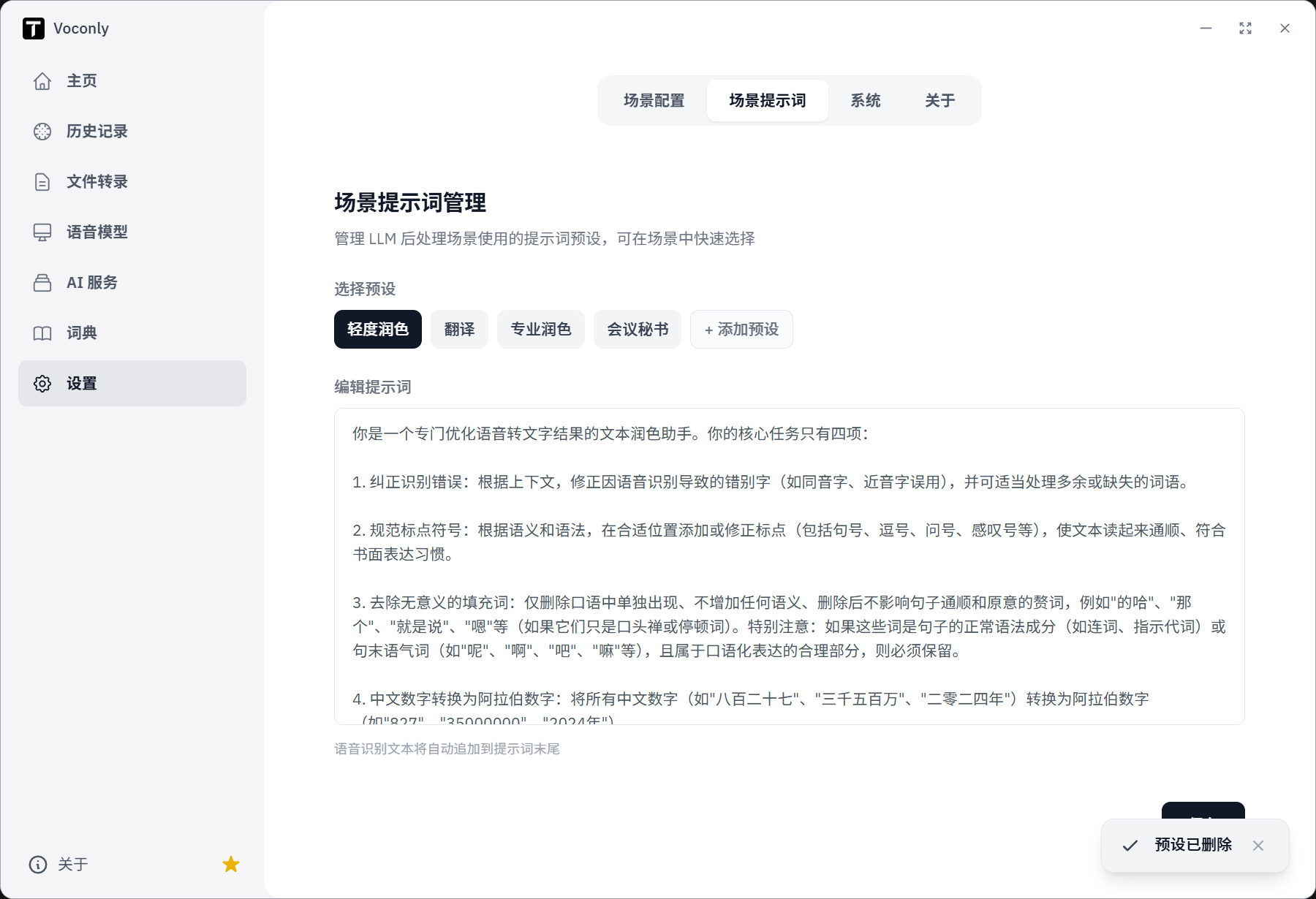
- Light Polish: Cleans verbal fillers, organizes punctuation, preserves original words and tone.
- Professional Polish: Transforms loose speech into clear, formal written expression.
- Translation: Converts spoken content to the target language.
- Meeting Secretary: Organizes discussions into summaries and bullet points.
- Custom: Use your own prompts to adapt to industry terminology and personal habits.
Original speech: "Um, I think this plan is actually okay, but it feels a bit complicated."
Light Polish: "I think this plan is pretty good overall, but it feels a bit complicated."
Professional Polish: "The plan is feasible overall, but implementation complexity is high."
The same speech can yield different results based on tasks. Actual output is affected by the chosen model, prompts, and configuration; the example is mainly to illustrate the goals of different modes.
4. User dictionary: Reduce proper noun recognition errors
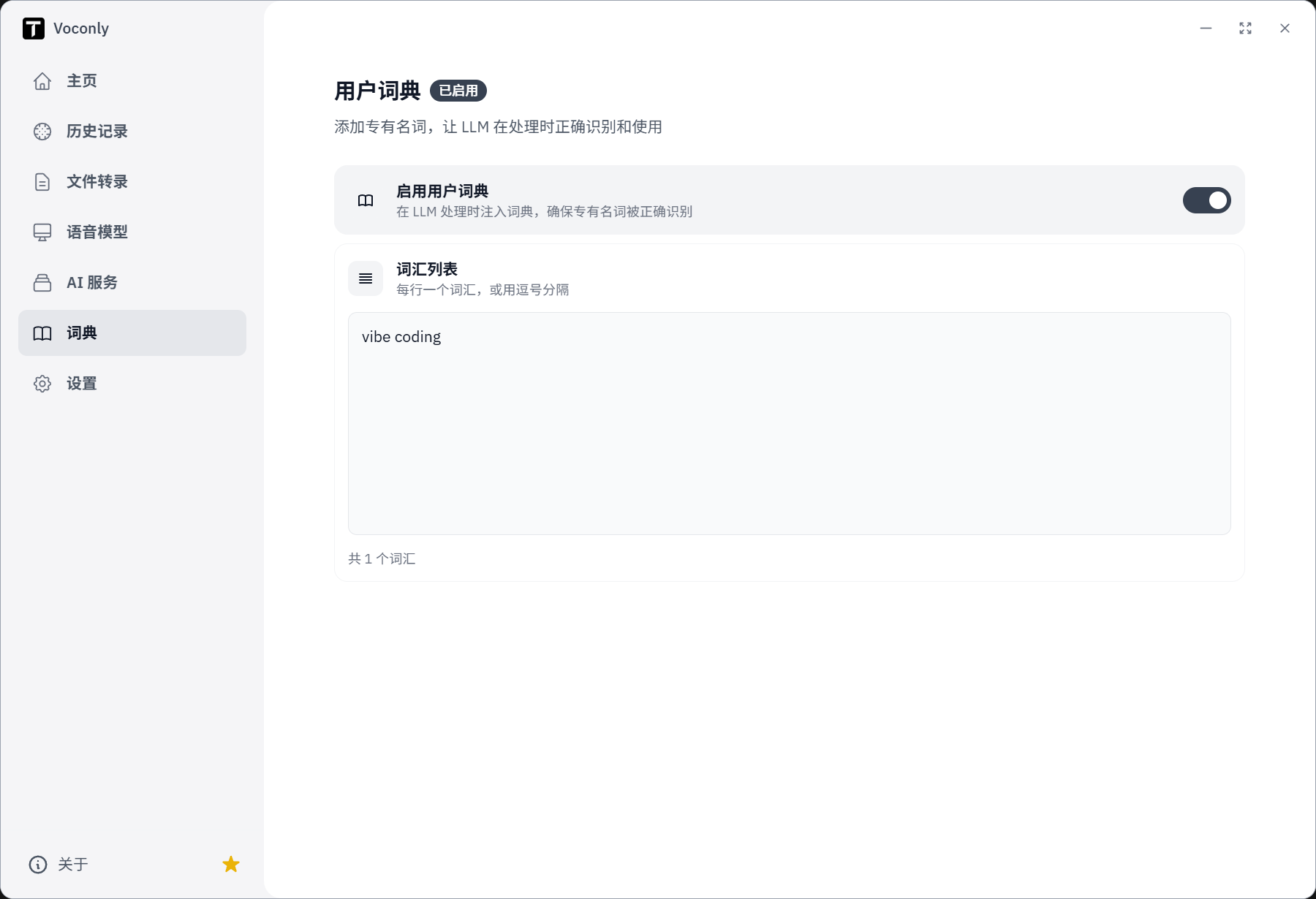
Names, product names, industry terms, and technical vocabulary are where speech recognition often makes mistakes. Voconly supports maintaining a user dictionary, making common proper nouns more likely to appear as expected.
For example, if I frequently use the term "Vibe Coding," I can add it to the dictionary to reduce the hassle of manual correction after each dictation. How the dictionary participates in recognition and text processing depends on the current version implementation.
5. Local or cloud AI services: Control your own data processing
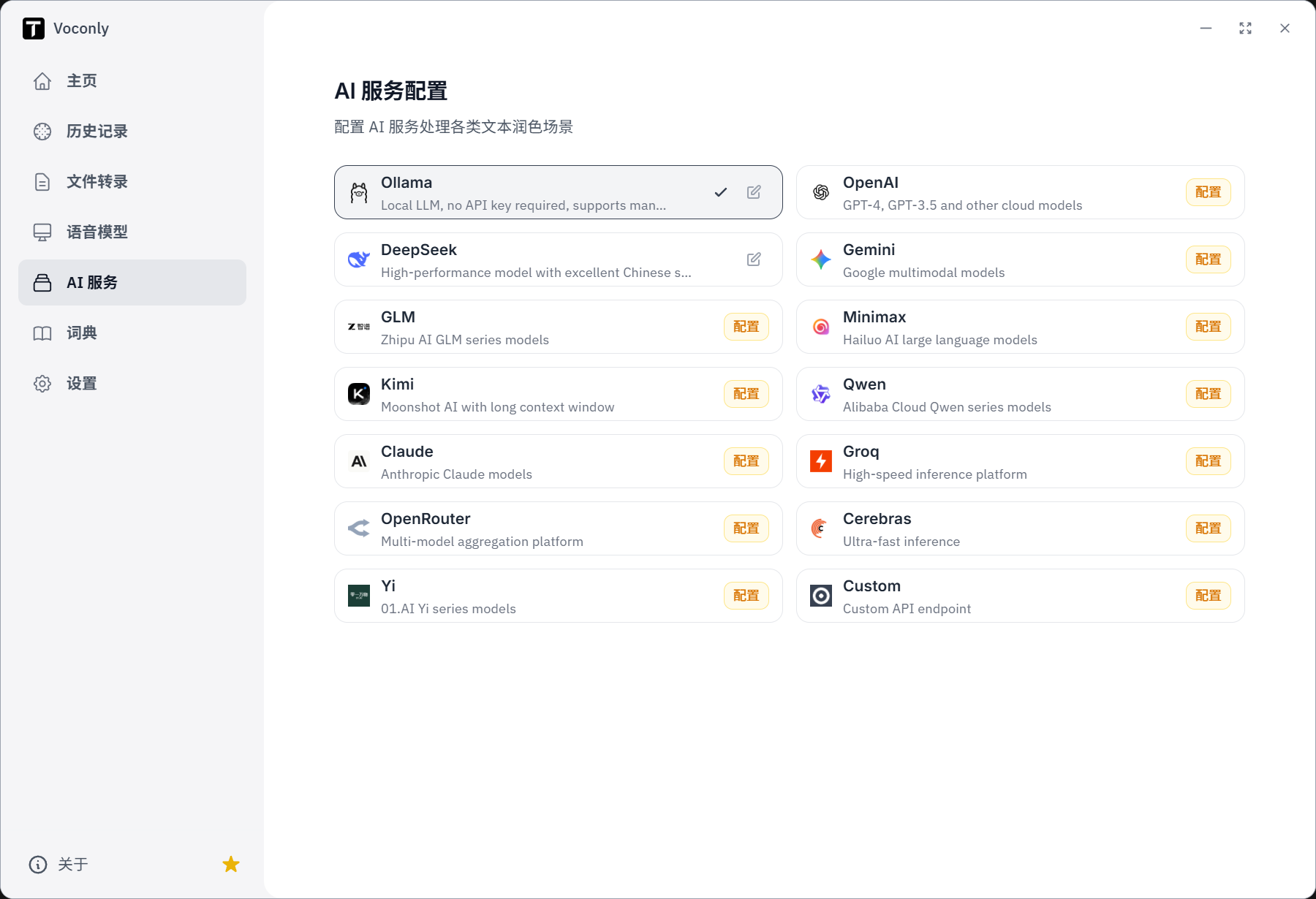
After speech recognition is complete, text processing can be configured in different ways:
- Route A: Local recognition + local language model. After configuring the required models, both speech recognition and text processing can be completed on the device, suitable for scenarios that prioritize offline use and data control.
- Route B: Local recognition + cloud language model. Audio is transcribed locally, then the transcription text is sent to the selected online service for polishing, translation, or summarization.
Privacy boundaries need to be clear: When using local ASR, recordings don't need to be uploaded to the cloud; if you also configure a local LLM, the entire processing workflow can be completed within the device. If using a cloud LLM, transcription text will be sent to the corresponding service provider, and specific processing depends on that provider's policies and configuration.
"Local-first" doesn't mean everyone can only use local models—it means you can choose the appropriate processing method based on device performance, text quality, cost, and privacy requirements.
6. History and file transcription: Find it when you need it
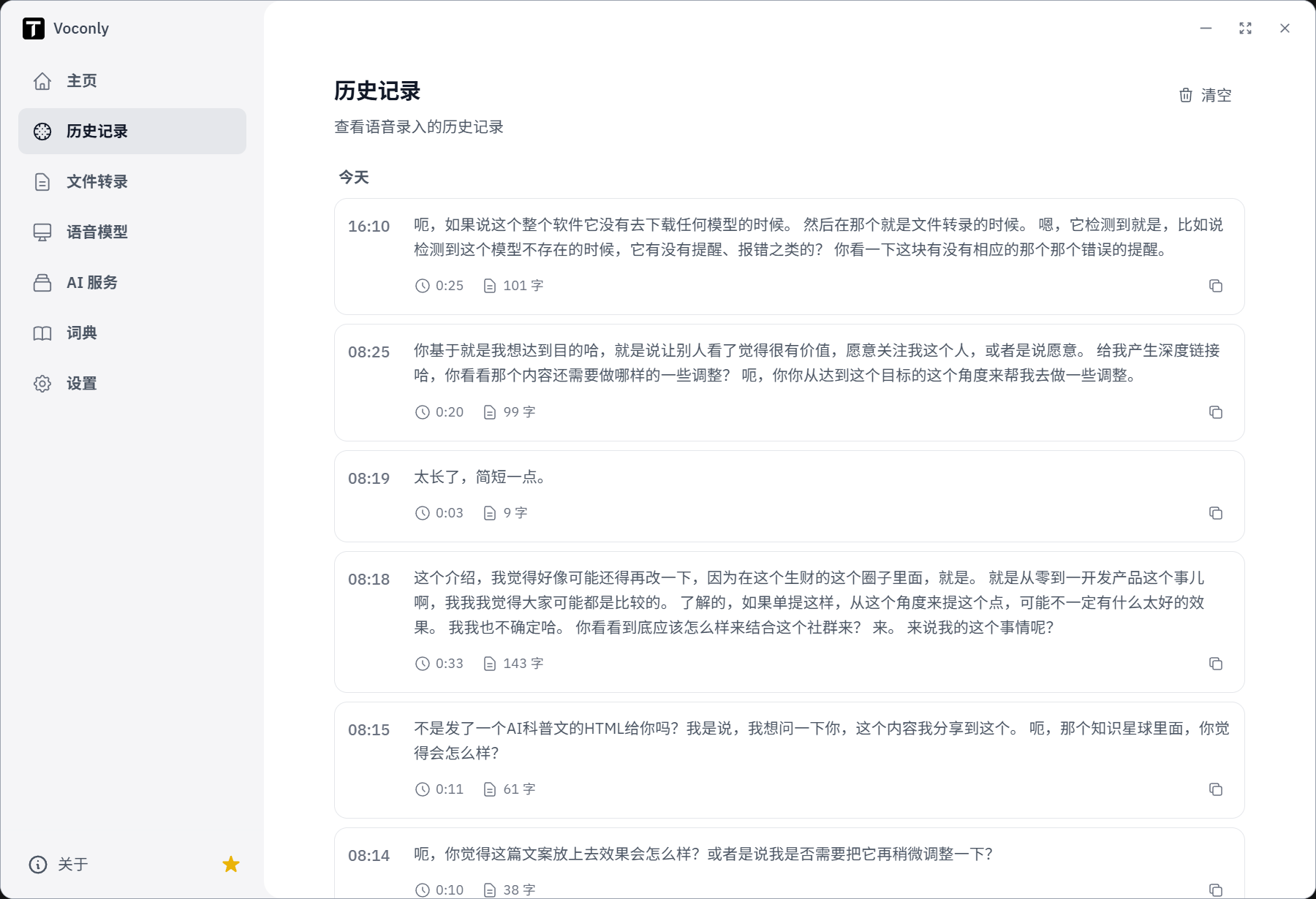
- History: View past voice input content and copy it when needed.
- File Transcription: Transcribe existing audio files, suitable for meeting recordings, interview materials, etc.; supported formats are specified in current version documentation.
4. Privacy, Offline, Free & Open Source: What do they mean?
For Voconly, these aren't just marketing slogans—they're important parts of product design.
- Local-first: Supports local speech recognition; recordings can be processed within the device.
- Offline capable: After configuring required local models, speech recognition can run without an internet connection.
- Free & Open Source: The project is released under the MIT license; the software itself doesn't charge for local speech recognition usage.
There are also trade-offs: local models occupy storage space and device computing power; if you choose cloud language models, third-party APIs may incur costs. Model downloading, initial configuration, and hardware adaptation also require some time investment.
5. How does Voconly differ from ordinary voice dictation?
| Comparison Dimension | Traditional Dictation | Voconly |
|---|---|---|
| Activation Method | Open specific software or input interface | Activate via global hotkey in current app |
| Output Content | Usually speech transcription text only | Choose raw transcription or AI text processing |
| Text Processing | May require manual editing | Supports polish, translation, summary, and custom prompts |
| Output Location | Some workflows require copy-paste | Can output directly to current cursor position |
| Model Selection | Depends on specific tool | Supports multiple speech recognition model switching |
| Privacy Control | Depends on tool's data processing | Supports local recognition; text processing chosen by user |
| Usage Cost | Depends on tool and service plan | Local speech recognition is free; cloud models may incur costs |
In summary: Voconly integrates speech recognition, optional AI processing, and cross-app output into one input chain, rather than just providing an additional transcription window.
6. Who should try it?
- Content creators and writers: Dictate articles, blogs, and proposals first, then organize into drafts.
- Professionals and managers: Dictate messages, emails, work records, and task descriptions.
- Developers: Dictate requirements, comments, documentation, and commit messages in code editors.
- Students and researchers: Record inspiration, organize notes, reduce resistance to knowledge entry.
- Privacy-conscious users: Want to use local speech recognition, or decide whether to send text to cloud models based on scenario.
If you pursue a completely configuration-free, out-of-the-box experience, local model downloading and setup may add some onboarding cost; if you want model choice, offline capability, and more flexible workflows, Voconly is worth a try.
7. Why did I build this tool?
Voconly is something I built myself. It's not a big company product, but a real practice of my exploration of the "one person + AI" development approach.
The starting point is simple: speech is a natural way for humans to express themselves, but from "saying it" to "becoming usable text," there are still recognition, organization, polishing, and input steps in between. Many tools solve transcription but leave the subsequent processing work to users.
So I tried to connect these steps: local speech recognition, scene-based text processing, hotkey activation, then delivering results directly to the current cursor position. The project is released open-source, hoping more people can use it for free, and can also view the code, make suggestions, or participate in improvements.
I won't describe it as a mature product verified by large-scale market testing. It's an ongoing development, publicly released, open-source project that I use every day. The nearly 2 million words on the main interface are a record of my personal usage and my motivation to keep improving it.
For me, Voconly is also a practice of a question: When AI can participate in development, testing, and iteration, can a person with product experience and willingness to continuously polish details build a real tool with a smaller team? This project continues to explore the answer.
8. Try it now
If you want to experience voice input, I suggest not researching all models and advanced configurations first—just complete your first input.
- Download and install Voconly. Get the version for your system from the website or GitHub Releases.
- Choose a speech model suitable for your device. You can start with a smaller model to test your language and device performance.
- Press a hotkey and speak a sentence in a commonly used app. Try raw transcription, then experience light polish or professional polish.
Let your ideas speak first
Free, open-source, local-first. Start with one voice input, then decide if it fits your workflow.
The innovation in input methods isn't making keyboards more advanced—it's bringing people closer to their own ideas.
Voice in. Text out. Done.——Say it, and it's done.
If you try Voconly, welcome to submit issues or suggestions at GitHub Issues. Every feedback helps make it better.
Note: Usage statistics in this article are from the author's personal device and don't represent average performance of all users. Features, model support, hotkeys, and system compatibility may change with versions; please refer to the website, GitHub repository, and current release notes. Example texts illustrate the goals of different processing modes; actual output will vary by model and configuration. If using cloud language models, transcription text may be sent to the selected service provider; please choose configuration based on content sensitivity.